> ## Documentation Index
> Fetch the complete documentation index at: https://docs.vizkraft.com/llms.txt
> Use this file to discover all available pages before exploring further.
# Share links
> Share a dashboard with stakeholders via password-optional links, expiry, revoke, and delete—without building an SDK integration.
export const DocsDemoVideo = ({category = 'cookbooks', slug, caption}) => {
const base = `/public/recordings/${category}/${slug}`;
return
{caption ?
{caption}
: null}
;
};
Share links are for humans who need a URL. They are **not** a replacement for multi-tenant [@vizkraft/embed](https://www.npmjs.com/package/@vizkraft/embed) sessions. Use the SDK when a partner app must mint liquid-scoped sessions. See [Overview](/embed/overview).
Open [app.vizkraft.com](https://app.vizkraft.com) → dashboard → **Share**.
## Create a link
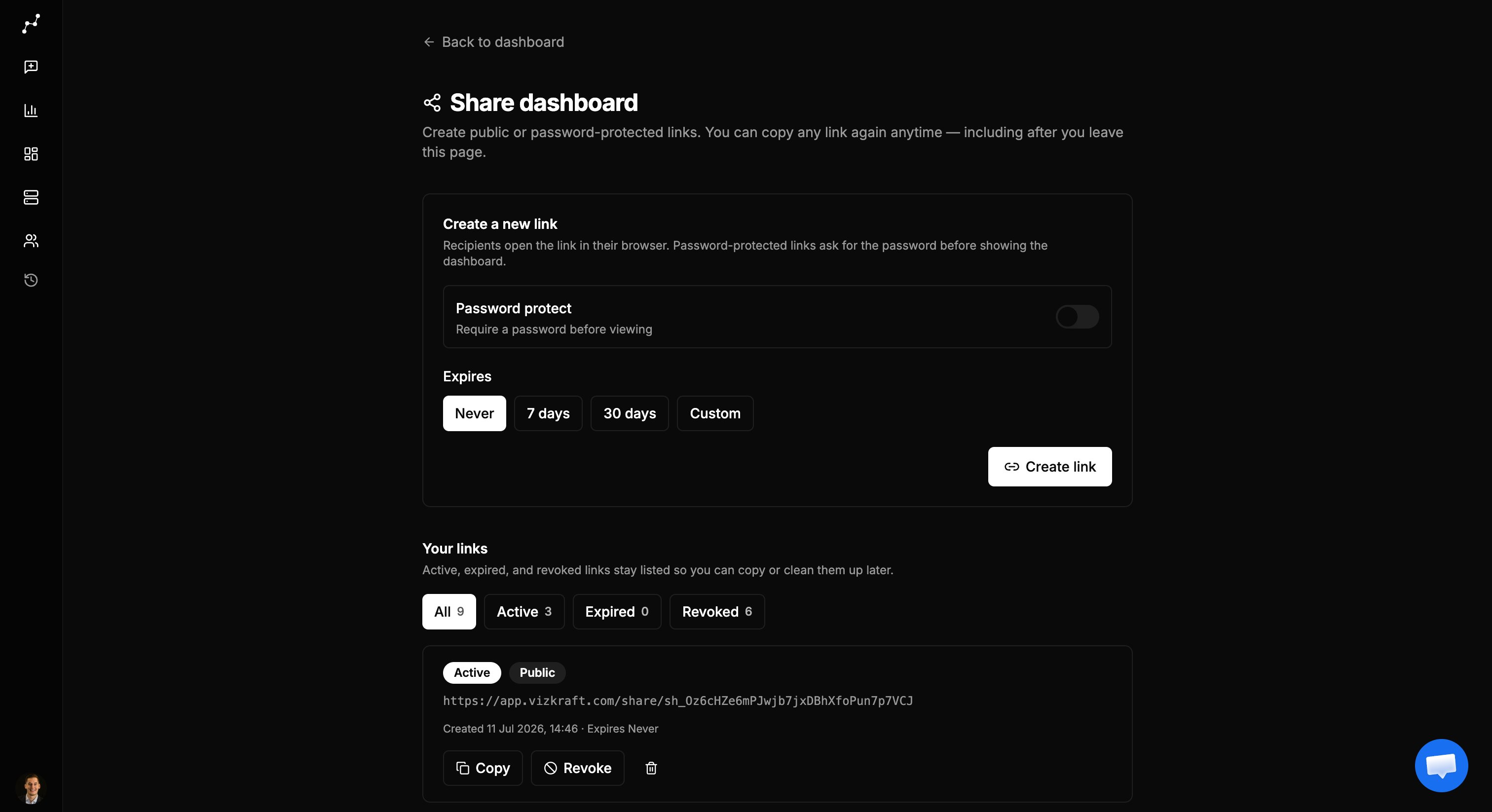
1. Open the dashboard and click **Share** (opens `/dashboard/[id]/share`).
2. Choose **public** or **password-protected** access.
3. Optionally set an **expiry**.
4. Click **Create link**. The full URL stays listed so you can copy it again anytime.
## Manage links
| Filter | Meaning |
| ------- | ------------------ |
| Active | Usable now |
| Expired | Past expiry |
| Revoked | Explicitly cut off |
Actions:
* **Copy** — re-copy the stored URL
* **Revoke** — stop access (active links)
* **Delete** — permanent remove (confirm)
Pagination shows 10 links per page.
## Recipient experience
1. Open `/share/sh_…` (no Vizkraft login).
2. If password-protected, enter the password on the unlock page.
3. Continue into the embed viewer for that dashboard.
What recipients see (title, filters, download) follows the dashboard’s [Viewer options](/embed/viewer-options). Chart failures show friendly public errors—not SQL.
## When to use which
| Need | Use |
| ----------------------------- | ------------------------------------------------------- |
| Partner product, many tenants | [Developer guide](/embed/developer-guide) + liquid tags |
| Board / vendor one-off link | Share links |
| Both | Configure embed for the product; share for humans |
## Related
* [Security](/embed/security)
* [Admin setup](/embed/admin-setup)
* [Partner demo](/embed/partner-demo)
 1. Open the dashboard and click **Share** (opens `/dashboard/[id]/share`).
2. Choose **public** or **password-protected** access.
3. Optionally set an **expiry**.
4. Click **Create link**. The full URL stays listed so you can copy it again anytime.
## Manage links
| Filter | Meaning |
| ------- | ------------------ |
| Active | Usable now |
| Expired | Past expiry |
| Revoked | Explicitly cut off |
Actions:
* **Copy** — re-copy the stored URL
* **Revoke** — stop access (active links)
* **Delete** — permanent remove (confirm)
Pagination shows 10 links per page.
## Recipient experience
1. Open the dashboard and click **Share** (opens `/dashboard/[id]/share`).
2. Choose **public** or **password-protected** access.
3. Optionally set an **expiry**.
4. Click **Create link**. The full URL stays listed so you can copy it again anytime.
## Manage links
| Filter | Meaning |
| ------- | ------------------ |
| Active | Usable now |
| Expired | Past expiry |
| Revoked | Explicitly cut off |
Actions:
* **Copy** — re-copy the stored URL
* **Revoke** — stop access (active links)
* **Delete** — permanent remove (confirm)
Pagination shows 10 links per page.
## Recipient experience
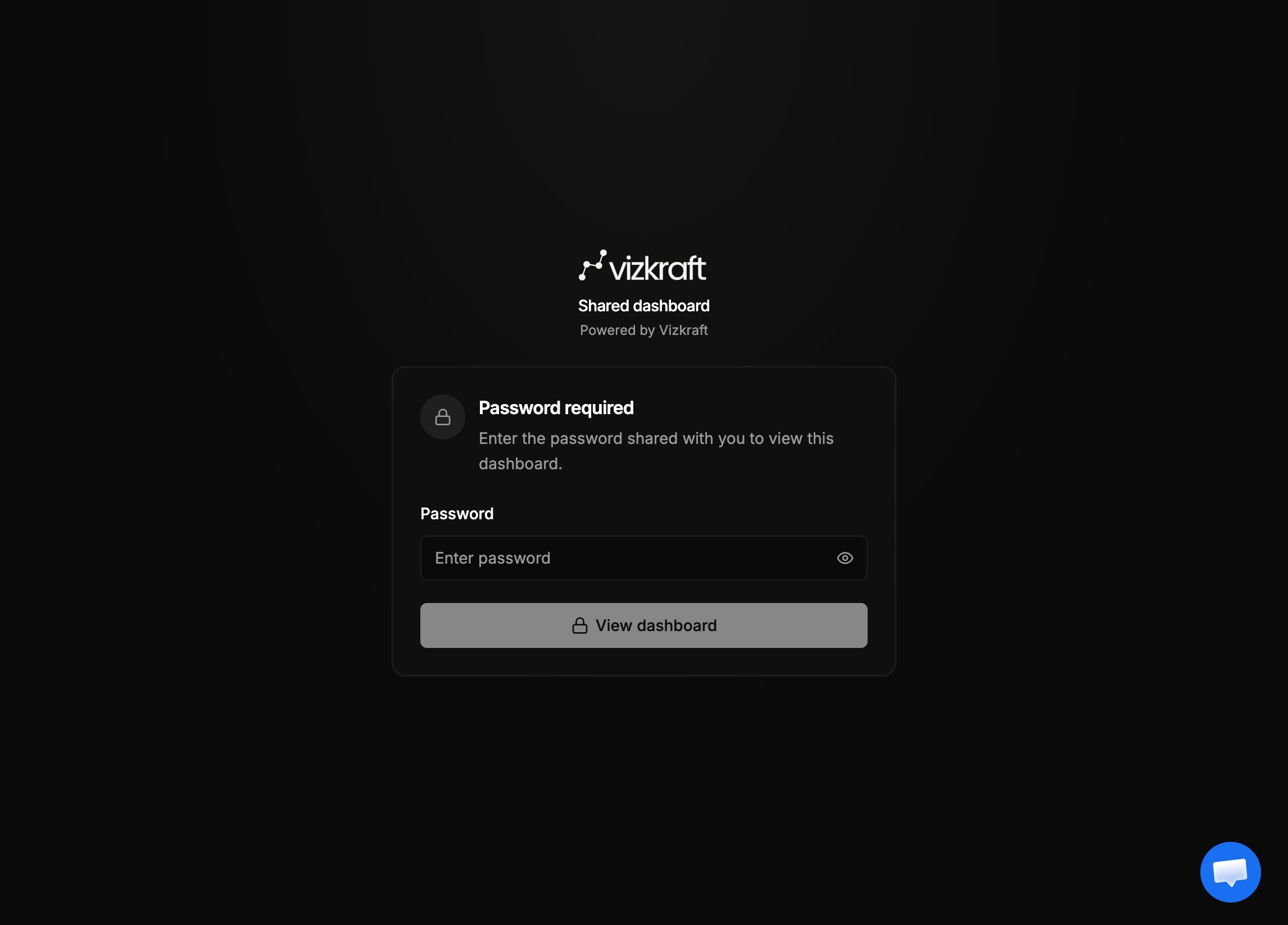 1. Open `/share/sh_…` (no Vizkraft login).
2. If password-protected, enter the password on the unlock page.
3. Continue into the embed viewer for that dashboard.
What recipients see (title, filters, download) follows the dashboard’s [Viewer options](/embed/viewer-options). Chart failures show friendly public errors—not SQL.
## When to use which
| Need | Use |
| ----------------------------- | ------------------------------------------------------- |
| Partner product, many tenants | [Developer guide](/embed/developer-guide) + liquid tags |
| Board / vendor one-off link | Share links |
| Both | Configure embed for the product; share for humans |
## Related
* [Security](/embed/security)
* [Admin setup](/embed/admin-setup)
* [Partner demo](/embed/partner-demo)
1. Open `/share/sh_…` (no Vizkraft login).
2. If password-protected, enter the password on the unlock page.
3. Continue into the embed viewer for that dashboard.
What recipients see (title, filters, download) follows the dashboard’s [Viewer options](/embed/viewer-options). Chart failures show friendly public errors—not SQL.
## When to use which
| Need | Use |
| ----------------------------- | ------------------------------------------------------- |
| Partner product, many tenants | [Developer guide](/embed/developer-guide) + liquid tags |
| Board / vendor one-off link | Share links |
| Both | Configure embed for the product; share for humans |
## Related
* [Security](/embed/security)
* [Admin setup](/embed/admin-setup)
* [Partner demo](/embed/partner-demo)